Who else feels like web designers speak another language? When it comes to knowing how websites work or their essential website elements, it’s important to know that every website is built with the same principles in mind, and once you understand the parts of a website, you will be better equipped to make decisions. Web design, as the process of creating the structure and look of a website, plays a crucial role in this understanding.
In this blog post, we’ll help you understand the website components, what they do, and how they work together. If you or your web designer is building a website from scratch or simply improving an existing one, website builders can be valuable tools to help you create your own website without extensive coding. Whether you are managing your own website for personal or business purposes, this article will help you reach the same end goal of putting the pieces together for a performing website. Understanding the parts of a website is also valuable for those interested in web development, as it forms the foundation for building and customizing sites.
Understanding why the Anatomy of a Website is Important
Before diving into the elements that make up a website, it’s essential to understand why they matter. Think about it this way, before a doctor can succeed in medical school, they need a solid understanding about human anatomy. The same goes for website developers and the anatomy of a website. Just like in the human body, websites have many interconnected parts, and understanding how they work together as one functional system is essential for building and maintaining a website.
Knowing the anatomy of a website is a helpful tool that will give website owners the confidence to manage their own. These are a few reasons why understanding the parts of a website is important:
- Communication: You’ll have the ability to effectively communicate your goals and needs to designers and developers.
- Traffic: If visits to your site are low, you can catch underperforming areas and quickly resolve the issue. Factors like site speed can significantly impact both user experience and your website’s SEO.
- SEO: Having a strong website that is easy to crawl and has fast performance is more likely to rank better on search engines. Both technical and content elements collectively influence your website’s SEO. Understanding search engine optimization helps you enhance your site’s visibility and ranking by optimizing structure, content, and design.
- User Experience: A structured website with intuitive navigation leads to high customer satisfaction and retention rates. Good website usability and thoughtful organization contribute to a positive user experience, making it easier for visitors to find what they need and engage with your content.
The 5 Most Basic Website Design Parts
At first glance, the website structure might seem simple, but that is not the case. Websites are made up of many parts that come together to form a complete experience that supports your goals. These parts are considered essential elements of web design and contribute to the overall website layout and page layout. Before learning about the purpose of each part, here is a high level overview of the 5 most basic parts of a website. These are the standard web pages or website pages found on most sites.
- Header
- Navigation
- Main Body
- Hero Section
- Footer
Layout elements and web layout play a key role in organizing all the elements of a website, ensuring a cohesive structure across all web pages. Let’s explore these website elements in depth.
Header

The header, also known as the website header, is at the top of the page, and its main purpose is to immediately give the user recognition for who the brand is and provide them an easy-to-follow route to explore the website. Since it is displayed at the top, it’s one of the most important sections on your site because it will land on every page that your site has. The website header will typically include aspects like the company logo, search bar, navigation menu, navigation links, calls-to-actions, promotional banners, etc. The company logo plays a key role in branding and is often clickable, returning users to the home page or first page of the site. The navigation menu contains navigation links to core pages such as About, Services, and Contact, ensuring users can easily access essential sections. Favicons, which appear in the browser tab, provide a quick visual connection to your brand and help users identify your site among multiple open tabs. Navigation menus in the header can take various forms, including dropdown menu, mega menu, vertical menu, sidebar menu, and hamburger menu, and may be placed on the left or right side of the page depending on the site’s layout.
Best practices for designing a successful header:
- Reinforce brand identity with the company logo.
- The company logo should link back to the home page or first page (users expect this).
- Use the same website header on all the pages to keep consistency.
- Words should be simple and clear to match the brand’s voice and tone.
- Add color and design to grab the audience’s attention.
Navigation and Search Bar

Navigation menus are the map of your website, helping users navigate through their experience by providing clear pathways to different pages and other pages. The navigation menu typically contains navigation links to your homepage, services, products, contact information, and more, making it easy for a site visitor to move between multiple pages. Effective navigation menus organize multiple pages, allowing site visitors to quickly find what they need and improving overall usability.
When building a user-friendly navigation:
- Include the most important pages and ensure your navigation menu links to different pages and other pages across your site.
- Keep each of the labels to one or two words maximum.
- Start with the most important pages first in your navigation menu.
- Use a fixed navigation so the menu is accessible at all times.
- Adopt a collapsible menu for the mobile version of your website.
For more complex websites or complex websites with extensive content, consider advanced navigation menu types such as a dropdown menu, mega menu, or drop up menus to organize navigation links efficiently. These options help users navigate large or content-heavy sites and encourage visitors to explore more of your website.
Hero Section

The hero section is the large, visually appealing banner at the top, right underneath the header. It is often the first impression people see when landing on a page, and it should immediately grab the attention of the visitor. The hero section is often a key part of a landing page or landing pages, where effective landing page design keeps visitors focused on a single call to action. This section is designed for a specific page or particular page objective, minimizing distractions to maximize engagement. The hero section should establish your brand and showcase important web content or website content to immediately communicate your value and purpose, enticing the visitor to keep scrolling on your site and encouraging visitors to take the next step.
Key elements for an effective hero section:
- Background image, video, or otherwise capturing visual (with a brief description in the alt text to improve accessibility!)
- Headline
- Supporting text
- Call to action button(s) (a small but helpful element or helpful element that can convert a passive user into an active participant!)
- Brand element
Main Body and Website Content
This is where the fundamental information on your website will exist. The main body contains your web content and website content, including all the elements—text, images, videos, and other media—that communicate your message and support your website goals. This section is also where you provide in depth information to address user questions, build trust, and support SEO. Well-structured content in the main body can help your site appear more prominently in search results.
The purpose of the main body is to get the audience to interact with your website. This could be through a multitude of different options, depending on the kind of business you have. For example, ecommerce sites and an online store rely on the main body to showcase products, organize them into categories, and guide users through the shopping experience. Standard web pages such as your about page, contact page, and product pages are examples of website pages or web pages that form the foundation of your site. Core pages like the about page and contact page are essential for user navigation and should be easily accessible. Interaction can also be facilitated through contact forms, allowing users to reach out with inquiries or feedback. Videos and links to social media platforms can further engage visitors and help grow your audience.
The body of a website can contain all kinds of content; the main goal of this section is to provide the visitors with the information they came for.
Content types every website should have:
- Product descriptions and/or service details
- Blog posts
- One primary call to action (should appear multiple times)
- Videos
Footer Section
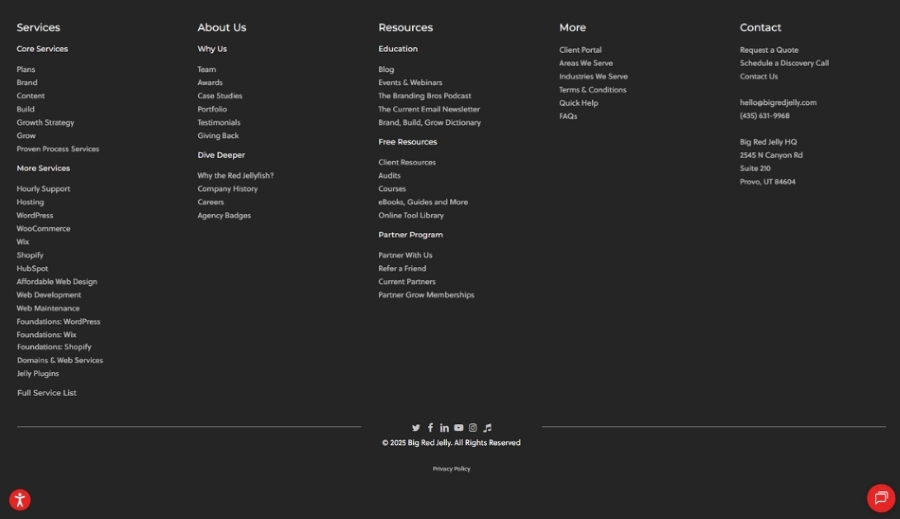
The bottom section on your website is the footer and should also appear on every page. The footer plays an important role for design and usability. The footer often serves as a second navigation bar to help you find other pages or important website pages and web page content that aren’t included in the main menu. A well-thought-out footer should help visitors find information quickly after scrolling through the entire page.
Must have components for your footer:
- Blog page
- Contact details, including basic contact information and location
- Legal and administrative information
- Social media links to various social media platforms
- FAQs
The Website Structure Explained
Now that you have an understanding of the 5 most basic parts of a website, it’s time to see how they connect with each other to form an online experience. A successful website is built by combining essential elements—such as headers, footers, and calls to action—with layout elements like cards and structured sections. When these essential elements and layout elements support each other, they create a cohesive, professional, and user-friendly site that achieves one common goal.
Starting at the top, the header and navigation work together to form your website’s organizational structure. This structure is defined by the website layout, web layout, and page layout, all of which influence usability and user experience. Together, they guide the visitor through the most important areas and give them the information they need to continue exploring your site. Effective navigation ensures users navigate your site easily, which is crucial for website usability and a positive user experience.
Right below is the hero section and main body. The hero section’s purpose is to instantly convey the main message and connect with the audience either emotionally or draw them in visually. The main body’s content should provide the users with solutions and showcase the value of the brand so they can make an informed decision to either purchase, schedule a service, call, or sign up for a newsletter. The arrangement of all the elements—text, images, videos, and other media—within the page layout helps site visitors and website visitors find what they need and encourages visitors to take action.
Just like in a story, the footer is a conclusion to wrap up the entire user experience. This can be through exploring new pages, connecting on other platforms, or to simply find more information about your brand.
What makes a website feel meaningful and intuitive comes down to how the website design parts work in tandem to form the perfect structure. The way all the elements are organized also impacts site speed and your website’s SEO, making performance and search rankings better. A sign that your website is designed and built well is when the structure is seamless and invisible to the user, supporting both usability and engagement for all site visitors.
How Website Components Work to Build Success for Your Business
Now that you understand the anatomy of a website, it’s time to take your online presence to the next level. Knowing about the foundation of your website is just the beginning, but building or improving a website takes talent, strategy, and creativity.
That’s where Big Red Jelly can help. Our Build strategists are experts in the field and create performing websites that are built on a strong foundation to convert visitors and grow your business.
If you’re looking to design a new website or improve your current one, Big Red Jelly can guide you through the next steps by:
- Building a website with a stunning design and purpose.
- Creating pages that are optimized for search engines.
- Setting up powerful online tools to help manage and track performance.
The parts of a website coming together is more than just your online presence. It’s the tool that is going to help your business be recognized, grow, and thrive. Connect with the Big Red Jelly’s Build Strategists to see how they can help build your website to match your business’s goals!