Who it’s for:
This guide is meant for small business owners, entrepreneurs, solo-preneurs, and new website designers who want to understand the fundamentals and basics of website and website wireframes.
What it offers:
You’ll learn what a website wireframe is, common tools, and best practices for structuring a wireframe before you begin your website design process.
Key takeaways:
- Understand what a wireframe is and why it’s important.
- Learn how to create a wireframe for a website design or redesign.
- Discover the best practices for making a wireframe and understand the tips the tricks to making an effective wireframe.
Understanding the Basics: What is a Wireframe in Web Design?
When it comes to web design, a wireframe is a sketch or blueprint of the structure of your website. An initial wireframe is often created during the early stages of the design process to map out the basic structure and page layout of the web page. Before getting started on the buildout, development, and design of a website, it’s important to first define what the site will look like in terms of which pages are included and how those pages relate to each other. More importantly, an effective website wireframe will define the hierarchy, layout, and relationship between pages, posts or post types, and overall organization of the website including parent/child relationships between pages and posts/categories.
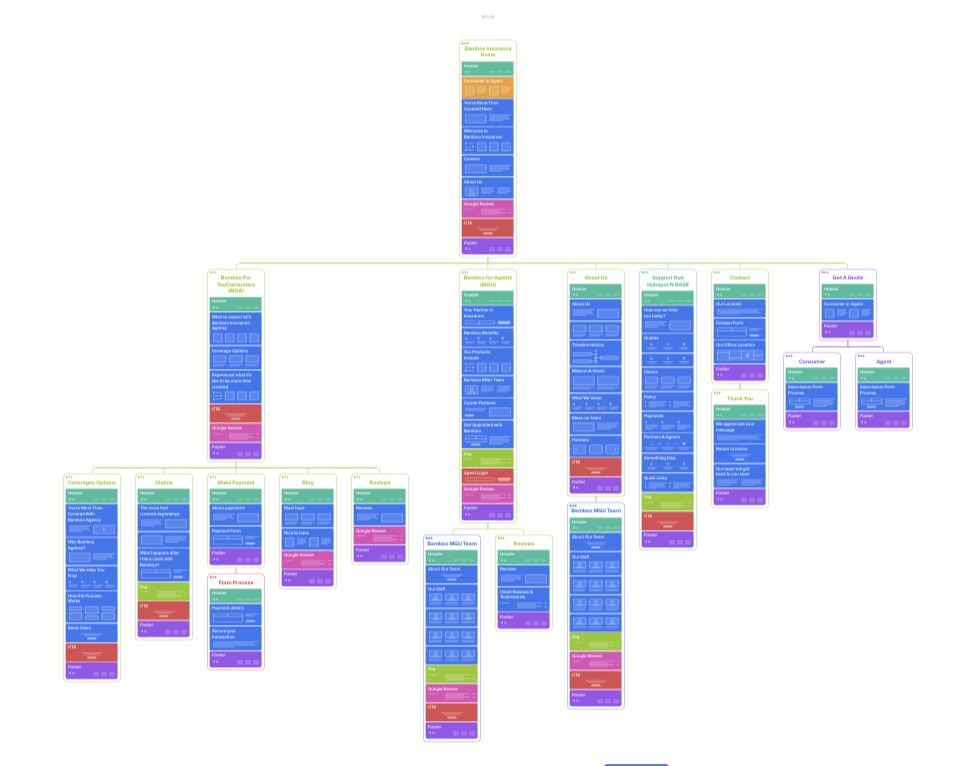
A website wireframe can be considered the initial planning document that outlines the strategy for the design and establish a clear line of communication between all of the involved parties. Wireframe design helps define the information architecture and page structure, including the arrangement of page elements. If the person who is building the wireframe needs approval or sign off on stages, the wire framing stage can be considered one of the most important. Establishing how the site is structured, which pages are included, how they relate to each other can help to avoid conflict or misunderstanding during later stages like design and functionality. Wireframes help ensure everyone is on the same page regarding intended behaviors and site functionality. Wireframes are typically presented as a “bare bones” sketch, serving as the skeletal framework of the website, focusing on layout and user flows rather than visual design. Often times, wireframes are grey scale or monochromatic boxes that are abstract representations of the pages that the site will have included. These rough sketches illustrate how wireframes focus on the structure and organization of the web page, showing the placement of key elements. These are typically organized in a vertical orientation and connected with small lines to represent the parent/child relationship between pages.
Why are Wireframes Essential for Website Success?
Wireframes should be much more than just simple boxes sketched out; they are the most critical tool for ensuring that the website is successful by including all key elements and essential components needed for the site’s functionality, so that users can navigate and interact with your site smoothly. By intentionally removing brand elements or visual distractions like colors, images and media, specific font families and styles, it focuses everybody involved on the user experience and the informational architecture of the site. Wireframes help address user needs and core functionality by mapping out user flows and the user interface, ensuring the design aligns with what users expect and how they interact with the site. With this focused approach, it makes it significantly easier for everybody to evaluate whether or not the site is completing its main function to potential users who will visit the site. If there are missing parts or pages, or the relationship and navigation on the site is flawed, no amount of good web design will be able to make up for it.
When evaluating wireframes, it is important to incorporate user feedback and follow an iterative process to refine the design, ensuring it meets business requirements and continually improves the site’s functionality.
Exploring Low Fidelity Wireframes vs. High Fidelity Wireframes
When considering how to structure your wireframe and how much detail to include, you need to decide first if your wireframe is going to what we call “Low Fidelity” or “High Fidelity”. The difference between the two comes down to how much detail and structure do you want represented on your wireframe. Do you want to include more than just the page title and subject? Do you even want to include specific sections on the page and the general layout of those sections? The more information that you include on your wireframe, the higher the fidelity.

Low Fidelity Wireframes
Low Fidelity wireframes are the fastest and easiest way to get started building out the concept for a website. Think of this as sort of “back of the napkin” wireframes. A simple wireframe or lo fi wireframe is often a rough sketch made up of basic shapes to represent interface elements like buttons, images, or text areas. You could get started with just simple boxes that only include the page title and subject. Low fidelity wireframes could include abstract visuals that represent how that page looks, maybe a small box for an image, squiggly lines for text, or even just Lorem Ipsum placeholder text to simulate real content. It’s important to understand that none of the details in a low fidelity wireframe should be taken seriously, it’s purely for thinking about the big picture for the site navigation and pages included. The goal for a low fidelity website wireframe is to validate your ideas about the overall architecture and user flow of the site without getting distracted or bogged down in the aesthetic or page design. While some low fidelity wireframes are hand-drawn, many are now created digitally using wireframing tools for greater efficiency.
High Fidelity Wireframes
High Fidelity wireframes, on the other hand, take a much more detailed approach and typically introduce more design elements and structure, which makes them look more like the intended final version of the website. Mid fidelity wireframes offer a balance between low and high fidelity, providing more detail and accuracy in layout and interface components without including full visual design elements. While you still want to steer clear of including specific branded elements like colors, images, font, etc, they usually do include the actual headings, body text, and the real layout and sizing of the elements on a page. The spacing of the elements more closely represents what it will actually look like as a finished product. Although it won’t be a pixel-perfect mockup of the site, it should provide the designers with a very good idea of how to design and develop your site and a better representation of the vision in mind. The downside of high fidelity wireframes is the time and energy it takes to create. We typically recommend first getting started with a low fidelity wireframes to cover any questions with the pages included on the site, then continue to flesh those out more by increasing wireframe fidelity and adding more detail as the design evolves with a high-fidelity wireframe or even build out the high fidelity wireframe directly on your content management system (CMS) with the understanding that it’s still to be used as brainstorming tool.
High fidelity wireframes help bridge the gap between the initial wireframe and the final product by incorporating visual design elements.

Key Wire Framing Tools and Software for UX/UI Designers
There are several ways to get started creating your wireframe. Some designers prefer to get down and dirty and brainstorm the wireframe of a website on a whiteboard or using a pencil and paper. This is obviously a more collaborative approach, but more recently, most wire framing is done with dedicated digital tools. Wireframing tools allow designers and the design team to create digital wireframes and collaborate efficiently on digital projects, ensuring alignment and streamlining the workflow.
Some of the most popular digital tools for creating a website wireframe include the following (many of these platforms offer wireframe templates, website wireframe templates, and even free templates to help users quickly create their own wireframes):
- Figma – Great for high fidelity wire framing and is designed to be as efficient as possible.
- Sketch – Quickly becoming one of the more popular tools used by website designers to create wireframes.
- Adobe XD – When initially introduced it wasn’t as popular, but it’s gaining steam among designers.
- Octopus.do – Uses AI to help create wire framing and has a drag-and-drop interface perfectly designed for low fidelity wireframes.
Wireframing tools are especially useful for complex projects, mobile wireframe creation, and ensuring the project team stays aligned throughout the digital project lifecycle.
Transitioning from Wireframe to Final Web Design: The Next Steps
By kicking off your website design process with a wireframe, whether it’s low fidelity or high fidelity, you’re setting yourself up for success and less confusion during the actual design of your website project. Now you can move into the visual execution of your wireframe. This is where visual design and visual design elements are introduced, building on the structure established during the wireframing stage. The wireframe has served its purpose; a brainstorm and discussion of what pages you want included, how those pages are organized, and the subject or main content on those pages. Now you know how users will navigate and interact with your website pages. The immediate next steps after finalizing your wireframe is to get started bringing that to life. This can either be done as a mockup format on a platform like Figma or Adobe, or you can start directly on your preferred CMS.
One of the most crucial next steps after creating your wireframe and while creating the mockups or first draft of your website is to fill in the blanks of content, media, and interactivity. The interactivity—links, forms, scrollability, menus, and other interactive features—should be incorporated into the user interface using interface elements to demonstrate basic functionality and enhance user experience. This is what will make your website an effective marketing tool for your business.
Reviewing the existing website and creating wireframes for your landing page or landing pages are important steps in the development process.
Frequently Asked Questions About CMS Website Design
What is the primary purpose of a wireframe?
The primary purpose of a wireframe is to serve as the structural and architectural blueprint of your website. It should demonstrate which pages are going to be included, how those pages are organized, and how the user will potentially navigate through your website. It can also include the subject and or general content that will belong on those pages.
What is the key difference between a wireframe and a mockup?
Wireframes tend to be lower fidelity and includes less details, especially branded elements like colors, textures, backgrounds, fonts. A mockup is a non-interactive version of the final design of the website.
What does "fidelity" mean in the context of wireframing?
Fidelity refers to how much detail or specific brand components and content is included on your wireframes. Fidelity is directly related to the realism and accuracy of the wireframe when compared to the intended end website design.
Why is it more cost effective to use wireframes?
Wireframes are significantly cheaper to build and change than a designed website. By defining the structure of the site and the pages, you can avoid wasting time and money building and designing pages that ultimately won’t be included because it wasn’t decided earlier and answering structural questions early on.
Who benefits from using and reviewing wireframes?
Going through the wireframing process can benefit everybody involved in the website project including the client (or your boss), designers, developers, and ultimately the end user. When you structure your website effectively by using a wireframe, the end user experience is better.