When creating pages and posts, especially in WordPress, you’ll find that you have several options (usually six) for headers. These aren’t just for styling or formatting, but instead can be used to make your posts and pages rank better on google and be more readable by your users. We’ll cover the usage of these headers and what the best practices are to make sure you’re making your posts and pages the most effective.
In WordPress, in the visual editor or classic editor, as you’re writing a post you’ll see these options:
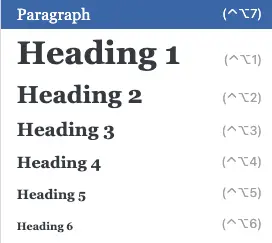
It might be easy to assume that these only change the visual style of the text you are using, but it does so much more than that. These options, when applied to headers, sub-headers, etc, actually add bits of formatting HTML to your text. These help search engines like Google know what your post or page contains.
Search engines will prioritize and weight these items over plain body or paragraph text. Your posts and pages should use these, but you can’t just make your whole post H1. There are some guidelines for these that will make your posts more readable and accurately indexed by search engines.
Rules For Using H1, H2, H3, etc.
H1 Tags
See what I did there? That first header above is what we would call a H2, then the next is an H3. Why did I jump right to H2 and skip H1? Because each page or post should only have a single H1 tag. In this case, the title of the blog is formatted as H1.
Your posts’ and pages’ single H1 tag should be your title of the page or something very similar to your general topic of your page. This is what search engines will use to learn about what to name or what to call your page when people are searching.
For example, your home page on your website should NOT be titled/named “Home” and it’s H1 tag should NOT be “home”. Instead, it should be titled maybe the name of your company or organization and your H1 should be something similar or maybe your main product or service.
The same goes for your contact page or about us page, or any other page for that matter. You shouldn’t have your H1 on your contact page just be “contact”, that’s good, but “contact [insert company name]” is better.
Headers & Tags Are Hierarchical
I’ve done it again. See how I didn’t go back to using an H2 tag when I’m still exploring sub-points that would be under the same category? Think of using H2 tags are sub-headers and H3 tags or H4 tags can be almost like bullet points in that same thought. Not only does this look good (if you’re styling is right on your website), but it helps to organize your topics and thoughts for your readers and for search engines.
Make sure that you’re organizing your headers so that all of the related points or headers are categorized under the superseding header. If you stripped away all of the content, and just looked at the structure, it might look something like this.
H1
H2
H3
H3
H3
H2
H3
H3
H4
H4
This helps search engines understand the structure and importance of the content. You should avoid skipping heading levels or jumping from a higher header (like H1 or H2) to lower levels (like H4 or H5)
Your Headers Should Be Keyword Optimized
You should include relevant keywords and key-phrases in your headings and headers, but avoid “stuffing”. Most search engines know this tactic and don’t reward that behavior. Your headers should be natural and summarize the content or copy that follows. The headers should add value to the reading experience and allow users to find the sections and content that they want/need.
MOST of your users are NOT going to be reading all of your copy. Allowing them to find valuable content fast is the best way to ensure that your users enjoy their experience on your site.
Your Headers Should Be Consistently Styled
If you are using a WordPress theme or page builder, this is probably handled for you. But make sure that your pages and posts are consistently using the same fonts, sizes, and styling throughout your site. This helps users more easily recognize and distinguish between major headings or sub-points.
Additional Tips And Tricks for Headers and SEO
Internal Linking
Use internal links to connect related content, improving navigation and SEO. These links to related posts should connect to posts or pages that share keywords or key-phrases that you might also be using in your headers or headings.
Alt Text for Images
Add descriptive alt text to images to enhance accessibility and SEO. You guessed it, all of this should be sharing, but not using identical, keywords and key-phrases. When using alt text for images, they should accurately describe what is actually in the image. DO NOT try to convince search engines of something else.
Meta Descriptions
Write compelling meta descriptions for each page to improve click-through rates from search results. Meta descriptions are what search engines will use as a sort of short description. These meta descriptions for pages and posts should accurately describe or summarize the content on the page without stuffing keyword or key-phrases.
Get Help With Your Pages and Posts!
Big Red Jelly is here to help if you have questions about how to maximize your effectiveness with your website. Not only do we specialize in creating beautiful user experiences, but it is all grounded in best-practices for SEO and conversion rate optimization. We make sure that your website represents your brand and converts users to leads or revenue for you! Get in touch with a Big Red Jelly Business Development Specialist today!