If you’re just getting started in blogging or using WordPress and want to increase your organic traffic (learn more about why we think you should be blogging here). You have to follow the fundamentals of SEO (search engine optimization). Yoast is a free/freemium plugin that you can install on your WordPress site or blog that makes optimizing your site and your pages or posts for SEO easier than ever. In this blog post, we will explore a specific feature of Yoast; the meta description field on pages and posts and how to write a meta description that search engines like Google and Bing will use effectively to help increase organic traffic to your website. You’ll find Yoasts’ meta description on your page editor, it should look something like this under the “Search Appearance” accordion/dropdown option:

What is a Meta Description?
The meta description for a page or post is a specific part of the page’s code that gives a summary or description of that page or post. Meta descriptions are roughly 150 characters long. This short description is displayed under the title in search results in Google. For example:
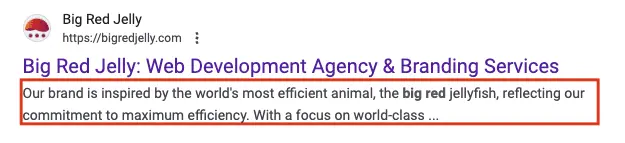
Not only is this important from an SEO perspective in that meta descriptions allow you to tell search engines what your page offers, but also can increase clicks on your search result appearances. If your meta description is an accurate representation of your page and is compelling, it should drive traffic to the page, and encourage engagement from that point on.
Why Do I Need Meta Descriptions?
The idea behind meta descriptions is actually pretty straight-forward. Meta descriptions help users who are searching for a specific term find what they are looking for faster, and help them decide which result to click on. Although most search engines say that there is no DIRECT benefit from the meta description (meaning that they don’t include the meta description in their algorithms) there are clear and definite indirect benefits from having a good Meta description. If your search results get more interaction, Google considers that result to be a more accurate and helpful result, which in turn helps your position move up the rankings. This is why accurate meta descriptions matter and need to accurately match the title and content of the pages or posts you write them for.
How Do I Write a Good Meta Description?
Here are some tips and tricks to writing a good meta description for your blog post or page on a WordPress site:
- Make sure it is relevant to the content of the page. If your meta description mis-represents your page content, this can lead to frustrated users and higher bounce rates.
- Make it unique. Avoid using the same meta description for all your pages or posts.
- Focus on keywords and key-phrases that users might be looking for.
- Include a call-to-action where appropriate.
- Keep it under 155 characters.
More detail on those points:
Relevant Meta Descriptions
When writing a meta description, make sure that it accurately represents the content on your page and sets expectations for what the user should find IF they decide to click on your search result. The longer the users stay on your pages and the more they interact with your website, the more likely they are to convert into a lead and this does indirectly help your search rankings and authority. Some search engines, like Google, may even penalize or suppress your posts and pages if they misrepresent your content or are misleading.
Having a Unique Meta Description
When users are searching for branded keywords (keywords that include your companies name), it is uncommon for several of the results in their search to be from your website. In this case you want to avoid having repeating meta descriptions displayed or shown there. The best way to do this is to personalize or customize each page and post so that they are unique and, referring to the point above, are relevant to the copy and messaging on that page.
Include Keywords and Key-Phrases
Include the words and phrases that users are expecting to see with that matching page or post title. You may not be able include ALL of the key features or keywords into your title, so including that in your meta description is a great way to provide users with more information that may help convince them that your search result is the right one for them. If a user’s search includes a keyword from part of your meta description, Google will even highlight/bold that word in their search results, making it even more likely that users will interact or click on your result. Below is another example of a Google search for “big red jelly design” and what is displayed. Note that “Big Red Jelly” and “design” are bold on this clutch.co search result.

Include a Call-To-Action
Your meta description is a great place to start the conversation of working with your company. Including a call-to-action helps users understand your expertise and ability to provide products or services that they are looking for as opposed to just providing information.
Keep It Under 155 Characters
Most search engines, including google, cut off their meta descriptions at about 155 characters. This doesn’t mean that you can’t include more, you can, it just won’t be displayed. If you have a well-written, succinct message with a call-to-action included, that is likely going to perform better than having the same quality, but cut-off and ending with…
Big Red Jelly Can Help With Meta Descriptions
This is a lot of information, and the world of web-site design, marketing, SEO, and conversion rate optimization all comes at you fast. If you need help setting up your blog, your website, your marketing, or even just your meta descriptions, reach out to us and we’ll get started making sure that you’re getting the most out of your blog posts and pages.